by Kathy Terrill | Apr 3, 2018 | eCommerce Tips, Selling on eBay, Social Media Tips
Twitter schedule tools save eBay sellers precious time.
There are never enough hours in the day for eBay sellers. Time savers are a must for successful sellers. Social media schedulers are crucial. To set up social media on Twitter and Facebook, there are free schedulers like Hootsuite and Buffer. Content must be continually added to these tools. I have recently discovered a set it and forget it Twitter scheduler, TweetEye.( my affiliate link). TweetEye has a free version. TweetEye sets itself apart from other auto schedulers. It’s in a class by iteself, as it has features that minimize the sameness of its tweets.
First of all, set it and forget it Twitter schedulers are a gigantic help for sellers.
They have the capability of pushing fresh content out on social media with minimal upkeep. Twitter is a great way to quickly reveal products to shoppers on social media. The challenge with using Twitter, and other social media, is the time it takes to set them up.
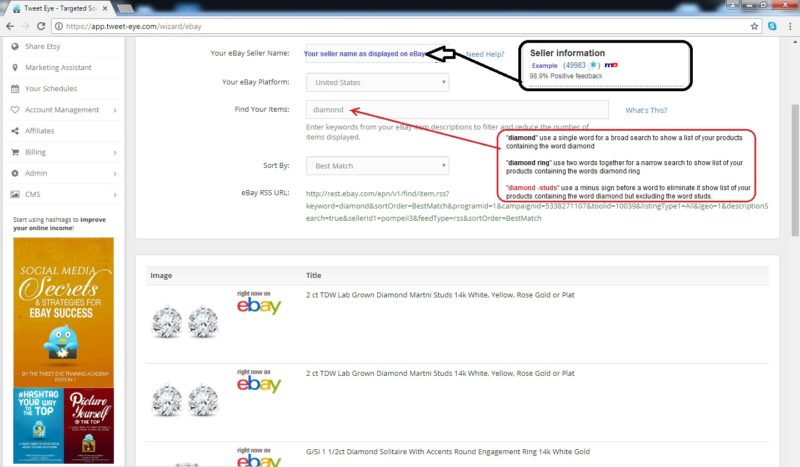
So, enter the solution, ( my affiliate ink) TweetEye. To use TweetEye, you’ll set up an account. Then link your social media. eBay and Etsy accounts can be synched into the tool. There is no need to have an eBay store to link your account. Once set up, click the eBay toggle.
Be sure to use the Keyword function in TweetEye. (Picture courtesy of TweetEye)
Next, you want to select a keyword to sort listings. This is very important. When you select a keyword, TweetEye will pull all your listings with that keyword.
A keyword could be dress, red, shirt, mug, winter etc.
You want to select something fairly broad and that has more than 10 listings. Once set up, as items sell from this matchup, TweetEye will replace with another item. It “refills” the schedule for you. There is no need to continually tweet items. Your TweetEye scheduler will do it for you.
Use numerous schedules to tweet your inventory. You can have one keyword dress schedule, one shirt schedule, one baseball schedule etc. It’s up to you. So, set up schedules with keywords that categorize your listings. Then let TweetEye do the work for you.
TweetEye does your tweets for you!
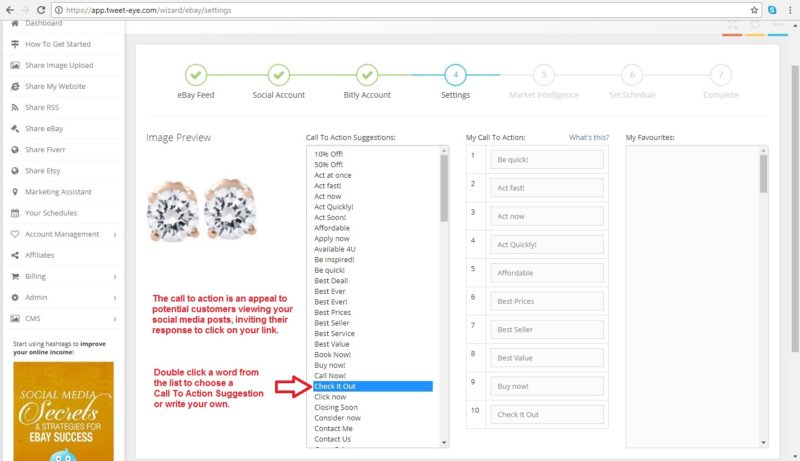
Once you’ve chosen your keyword, you’ll select the number of items to share. You can pick from one to ten. More than four is best. Next, select your Twitter account. After that, you can attach a bitly account. Now you’ve arrived at selecting your call to action. These are terrific. Call to actions are attached at the end of your tweet. They add variety to your social media. Pick the ones best suited to your items. After selecting your call to action be sure to check the Market Research box. Market Research uses algorithms of what is trending on social media to select the best hashtags for your Tweets.
Call to actions keep your tweets from being monotonous.
Market Trends takes the guesswork out of hashtag selection. Finally, when selecting the time your schedule will post, select a long post delay. I like five minutes. I want my tweets spread out.
Use this complimentary guide from TweetEye to set up your schedule. It takes only minutes. One pro tip. On the page for Market Intelligence UNCHECK show image. When checked TweetEye pulls the image from the RSS feed. It usually looks awful. When unchecked, your image comes from your listing.
Crafting individual tweets and uploading pictures to Hootsuite, Buffer and similar schedulers is great. If you have the time to customize your Twitter, do so. Using TweetEye (my affiliate link) you can run numerous schedules that operate on their own. Set up properly the schedule(s) will continuously pull product posts and tweet them. Occasionally it’s wise to live tweet. My Essential Social Media Cheat Sheet is loaded with ideas you’ll want to use. Twitter is great to push out a lot of product. Search engines can pick up your products from Twitter and help customers find you.
In closing, sellers are very busy.
Tools that save sellers time are not to be overlooked.
TweetEye (my affiliate link) completely automates eBay product posts to Twitter. Many auto-schedulers are very spammy and boring. They spew out, Here’s my newest thing over and over. Who wants to read that? With customized calls to action and market watch hashtags, TweetEye avoids that. Best of all, it has a complimentary version. Let’s get tweeting!
by Kathy Terrill | Mar 27, 2018 | eCommerce Tips, Selling on eBay
eBay Guaranteed Delivery program recently messaged a lot of USA sellers notices. Heads up, sellers. Pay attention to this winning program.
Promotional Tools Attract Shoppers!
eBay sellers want sales. First of all, many factors go into attracting customers. Start with optimized listings, with great pictures and keywords. With an eBay store, sellers access exclusive promotional tools. These are Promotions Manager, Promoted Listings, and Sale Events.
So, what if a seller does not have a store? What options do they have?
Especially relevant is social media. Done right, it attracts shoppers. My Essential Social Media Cheat Sheet offers proven strategies to win in social media. Your complimentary copy is right HERE.
There is an eBay program that offers sellers a boost in sales with or without an eBay store!
Furthermore, it carries no additional fees to sellers. It is eBay’s Guaranteed Delivery program. Dotcom Distribution did a recent survey. It found 87% of shoppers look to fast delivery as key to their decision to buy. So, Guaranteed Delivery gives online consumers what they want. To qualify for Guaranteed Delivery, listings must have same or one business day handling. In addition, a return policy and immediate payment are mandated. Also, sellers must have a record of shipping on time, with great customer service. They DO NOT need to have a store to qualify! HERE are the eligibility requirements in detail. You can print labels with eBay shipping and other services, including Stamps.com. (My affiliate link)
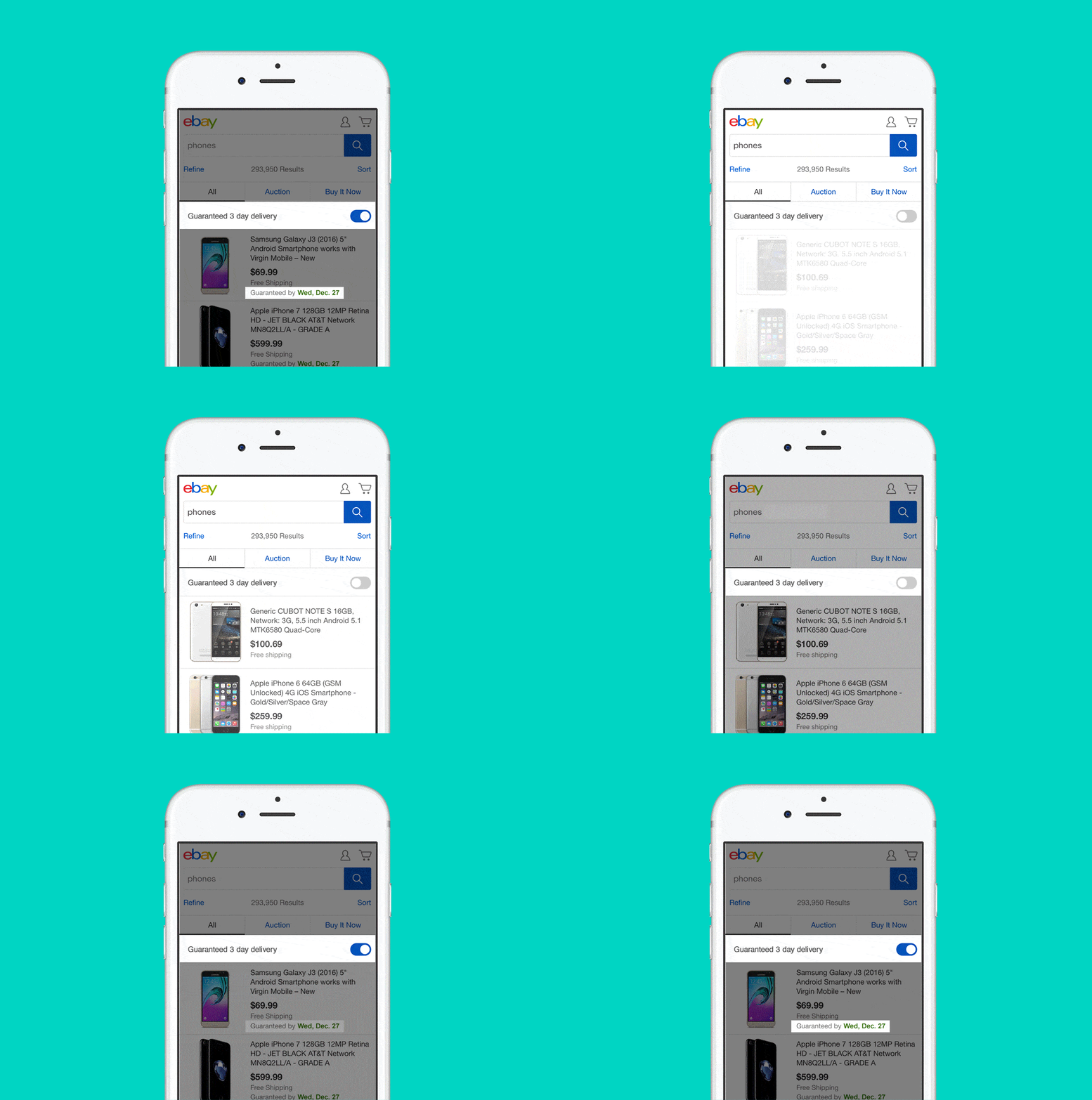
So, once accepted into the program, listings that comply are automatically enrolled. This a total win for sellers. This is why. Shoppers are offered Guaranteed Delivery items in several filters. One is a three-day delivery toggle. Additionally, this toggle shows on devices and computers at the top of product search.
Guaranteed Delivery is featured to buyers! (image from eBay)
So, there are also one to four-day delivery filters for shipping options on computers. Furthermore, these filters are at the top of the filter section. Simply, only Guaranteed Delivery listings show in the filters. So, once in Guaranteed Delivery, qualifying listings appear in more eBay search placements. There is no additional fee to the seller for this added exposure.
My YouTube video, eBay Guaranteed Delivery –The Good, The Bad, The Ugly details the benefits of Guaranteed Delivery. In addition, it includes some bonus search tips.
In conclusion, Guaranteed Delivery is the seller’s best friend.
It has no additional seller fees. Furthermore, it’s a home run with added search benefits. So, if you’re not in now, watch your eBay messages. While waiting, get your listings ready. Once in, enjoy the added search exposure and sales!
by Kathy Terrill | Feb 16, 2018 | eCommerce Tips, Selling on eBay
Sellers of all levels ask the same critical question. “What’s a money maker on eBay?”
No matter if you thrift, do retail arbitrage or buy wholesale, eBay sellers want to know, ” What will sell and make me good money now?” Immediately after discovering popular products, the next question is “How do I get some?” Offering in-demand inventory is important to selling success. Equally vital is having a relationship with good inventory sources. Sellers shop thrift shops, yard sales, traditional brick and mortar stores and buy wholesale. Having more than one source of inventory is wise.
To start, successful sellers discover and then sell in-demand items. They stay on top of the trends, watching pop culture, social media, and retail trends. Most online entrepreneurs develop expertise in several areas. So, sellers become adept at men’s, women’s and kid’s clothing, sporting goods, toys, video games and much much more.
According to DMR, there are over 25 million eBay sellers with over a billion items listed.
There are millions of sellers on eBay!
With the millions of vendors and a vast array of products on eBay, often entrepreneurs will stick to one or two tested inventory categories. While it’s important to develop areas of expertise, to remain successful, it’s good to stretch. Find and test new product lines constantly.
Oftentimes, it’s smart to add categories that relate to listings that are good money makers for you.
For instance, if women’s clothing does well for you, add women’s hats. Are your car accessories popular? If yes, then include motorcycle accessories etc.
Even experienced sellers can walk by unfamiliar hot products. Don’t make the mistake I describe in this video.
In closing, spend time on social media to be aware of popular trends. Develop relationships with reliable sources of inventory. Having more than one source of goods is smart.
Be alert, to new opportunities for product lines you may not have considered.
As much as it’s good business to develop an expertise, don’t neglect to consider all product lines you come across. A few minutes of research can reveal an overlooked gold mine.
Be alert to new product lines that can be big sellers on eBay!
by Kathy Terrill | Feb 9, 2018 | eCommerce Tips, Selling on eBay
One area can waste hundreds of dollars for eBay sellers monthly.
This category of spending is something that sellers of all levels make errors in. Can you guess what it is? Is it inventory? Could it storage or travel? No, it’s shipping. That’s right sellers, it is the cost of mailing your packages.
To start, eBay beginner sellers often err by not weighing their items with all the packing materials. Wrapping materials, mailers and or boxes add weight and postage costs. First class shipping in the United States is up to 16 oz. When an item is heavier than that, the costs to the shipper can rise significantly. Here are the current rates as outlined on the Stamps.com blog. So, even when just starting to sell, a shipping scale is an excellent investment. You can purchase a scale that will weigh up to 50 lbs for less than $20. This page has suggestions on two scales.
Experienced entrepreneurs know that shoppers love free shipping.
Shoppers love free shipping!
Marketing Land reports a consumer study where shoppers say their top consideration when buying is free shipping. Free shipping attracts shoppers and sales. With that in mind, eBay sellers need to look carefully at their return rates. So for instance, items that have no little to no returns, free shipping is a very wise choice. However, for inventory with a high return rate, sellers to need to take a close look at profits.
When an item is returned, a full refund is expected, that includes the “free shipping”. You can charge a restocking fee. Realize that when you do so, you may lose customers to sellers who do not charge such fees. Look at your competition. Sellers that get a lot of returns, can build the cost of returns into their listing price and continue with free shipping and full refunds. Top Rated sellers can get a 10% Final Value Fee discount if their items meet the criteria for Top Rated Plus. Keep that in mind when selecting how you ship.
There is an alternative that can increase vendor’s profits. Charge for shipping.
Using this practice, when the item comes back, sellers refund the product price only. For sellers that get dozens of returns a month, this is a significant increase in profits. In addition, for heavy products, a shipping calculator offers a choice where the shipping cost is adjusted to the buyer’s location. Customers save money purchasing from vendors closeby.
This video discusses when to use free shipping and when not to.
In closing, always keep an eye on your sales profits. If you get few returns, free shipping is your perfect choice. However, if you sell in categories that get a lot of returns, charging for shipping can put more cash in your pocket.
Test and see what get you the best sales results!
by Kathy Terrill | Jan 25, 2018 | eCommerce Tips, Selling on eBay
There is a costly error that both new and experienced eBay sellers make. They grab a pile of inventory and start listing without researching what the items currently sell for. Sellers will glance at what similar items are currently listed for. They overlook checking what the product actually sells for. To start, if a new seller lists an item that is new with tags, they will list using the price tag on the item. If the tag is $80, they list the product for the same price. So, they are thinking that since the tag is $80, the item should sell for $80. What the tag price is and how much money it will sell for are often quite different. Research is key to seller success.
To list without eBay price research costs you money.
Without research you’re guessing on the listing price. Guessing costs you sales. Research can reveal an item is in demand. Therefore, you can price it higher than what you would guess looking at it. Correct pricing gets your listings sold as quickly as possible for maximum profits. Sellers can use eBay’s Advanced search to check what products sell for. This video explains utilizing eBay’s Advanced search for doing item price research.
Many successful sellers restock items that did well for them. In Sell It On eBay Now I explore this sales plan. Some entrepreneurs sold products six months ago, get more inventory and list without checking what the current selling price is.
Internet prices are like the stock market.
Prices go up and they go down. A few minutes using Advanced Search lets you know what the item will sell for now. If you are selling what looks to be a highly collectible or rare item, then more thorough research is advised. Terapeak is a professional eBay research tool. It has sold data going back three years. Here is my affiliate link for a free trial of Terapeak.
Price your eBay items to sell now!
To sell successfully on eBay, it’s wise to check prices on the worldwide web. FinancialMail speaks to shoppers looking on many websites for prices before they buy. Pricing competitively increases your sales. In closing, research will get your eBay items sold for the best value, in the shortest amount of time. Price research keeps your cash flowing.
A few minutes spent researching prices on eBay and the web pays big dividends. Set a price that attract shoppers wanting to buy!